
Marvel Rivals 경험 : 게임 설정 가이드를 최적화하십시오
마블 라이벌 최적화 게임플레이: 설정 조정에 대한 종합 가이드
마블 라이벌즈는 짜릿한 전투, 상징적인 영웅, 놀라운 비주얼을 선사합니다. 잘 최적화되었지만 설정을 미세 조정하면 게임플레이의 유동성과 제어력이 크게 향상될 수 있습니다. 이 가이드에서는 하드웨어의 잠재력을 극대화하고 내면의 슈퍼 히어로를 최대한 활용하기 위한 디스플레이, 그래픽 및 오디오 설정 조정 방법을 자세히 설명합니다.
참고: 명시적으로 언급되지 않은 설정(바인딩, 접근성, 소셜)은 개인 취향에 따릅니다.
마블 라이벌: 최적의 디스플레이 설정
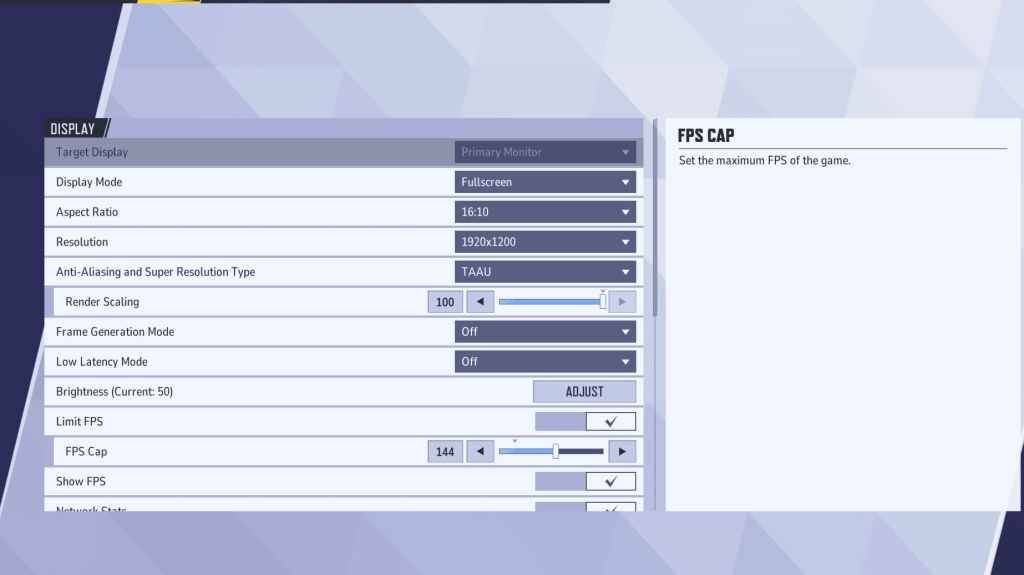
기본 사항인 디스플레이 설정부터 시작하세요. 전체 화면 모드는 FPS를 극대화하고 방해 요소를 줄이기 위해 모든 시스템 리소스를 게임에 집중하는 최적의 성능을 위해 권장됩니다. 경계 없는 창 모드는 멀티태스킹 편의성을 제공하지만 프레임 속도가 저하되고 입력 지연이 발생할 수 있습니다.
| Setting | Description | Best Setting |
|---|---|---|
| Display Mode | How the game is displayed. | Fullscreen (prioritizes performance); Borderless Windowed (allows multitasking) |
| Resolution | Screen resolution. | Monitor's Native Resolution |
| Aspect Ratio | Game display width and height, matching your monitor's native ratio. | Monitor's Native Aspect Ratio |
| Anti-aliasing & Super Resolution | Technologies for anti-aliasing and resolution scaling. | Experiment to find optimal balance between visuals and performance. |
| Frame Generation | Varies by PC; TAAU is generally safe, but experiment for best performance. | Off |
| Low Latency Mode | Reduces input lag (Nvidia GPUs only). | On + Boost (if available) |
| V-Sync | Synchronizes frame rate with monitor refresh rate; may introduce input lag. | Off |
| Limit FPS | Caps maximum frame rate; stabilizes performance and reduces GPU strain. | Monitor's refresh rate |
| Show FPS | Displays current FPS on-screen. | On |
| Network Stats | Displays network statistics. | On |
마블 라이벌: 최적의 그래픽 설정

그래픽 설정은 성능에 큰 영향을 미칩니다. 경쟁적인 플레이를 위해서는 시각적 충실도보다 성능을 우선시하고, 더 부드럽고 반응성이 뛰어난 게임 플레이를 위해 대부분을 낮음으로 설정하세요. 고급형 PC에서는 중간 또는 높음 설정으로 시험해 볼 수 있습니다.
| Setting | Description | Best Setting |
|---|---|---|
| Graphics Quality | Preset adjusting multiple visual settings. | Custom |
| Global Illumination | Simulates light bouncing; higher settings are more realistic but demanding. | SSGI – Low Quality |
| Reflection Quality | Clarity and realism of reflections; impacts performance. | Screen Space Reflections |
| Model Detail | Complexity and realism of models; higher settings require more processing power. | Low |
| Post-Processing | Adds visual effects (motion blur, depth of field); reduces frame rates. | Low |
| Shadow Detail | Sharpness and quality of shadows; significantly affects performance. | High |
| Texture Detail | Resolution of in-game textures; higher settings require more VRAM. | Low |
| Effects Detail | Quality of visual effects; lowering reduces clutter and boosts performance. | Low |
| Foliage Quality | Density and detail of environmental elements; lower settings improve outdoor FPS. | Low |
조준 정확도를 높이려면 게임과 Windows 설정 모두에서 마우스 가속을 비활성화하세요.
마블 라이벌: 최적의 오디오 설정
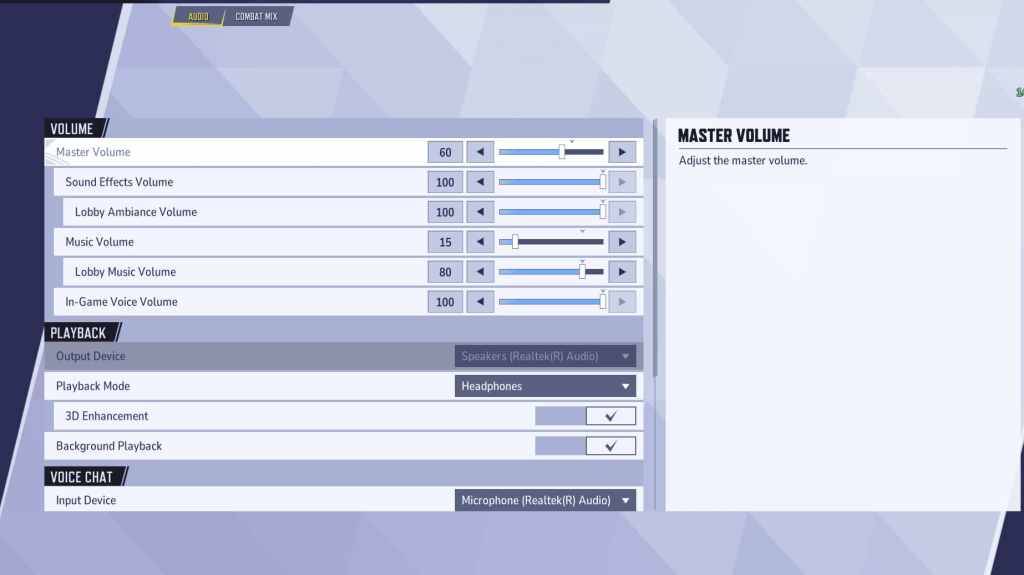
오디오는 게임플레이를 크게 향상시킵니다. 향상된 공간 사운드를 위해 3D 향상을 활성화하여 적의 위치를 정확히 찾아내는 데 도움을 줍니다. 향상된 오디오 신호를 얻으려면 HRTF(사용 가능한 경우)를 사용하세요. 원하는 대로 볼륨 레벨을 조정하세요.
다음: Marvel Rivals 최고의 팀 구성 능력











- 1 Zenless Zone Zero [ZZZ] 코드(2024년 12월) – 1.4 Livestream 코드 Feb 08,2025
- 2 Capcom Spotlight 2025 년 2 월 및 Monster Hunter Wilds Showcase : 모든 것이 발표되었습니다. Mar 05,2025
- 3 2025 년 3 월에 새로운 레고 세트 : Bluey, Harry Potter 등 Mar 06,2025
- 4 고딕 1 리메이크 데모 : 프레임 별 비교 원본 May 01,2025
-
5
2025 년 1 월에 코드를 사용할 수 있습니다 Feb 13,2025 - 6 "어 ass 신 크리드 그림자는 캐논 모드를 공개합니다" Apr 26,2025
- 7 Pokémon TCG Pocket은 프리미엄 패스 및 트레이드 토큰을 공개합니다 Apr 21,2025
- 8 Roblox의 RNG War TD 코드 출시(2025 업데이트) Feb 12,2025



![Business of Loving [v0.12.5i] [Dead End Draws]](https://imgs.96xs.com/uploads/18/1719555107667e5423ef803.jpg)












