
Fortnite Mobile: Accessing and Buying Skins with V-Bucks Guide
Exciting news for Mac users: you can now dive into the action-packed world of Fortnite Mobile on your Mac using BlueStacks Air! Get started with our complete guide on how to play Fortnite Mobile on Mac with BlueStacks Air.
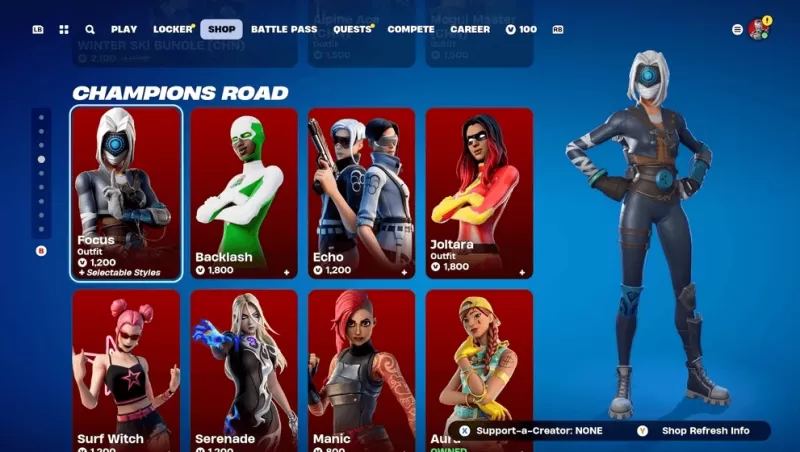
Fortnite Mobile, the beloved battle royale and sandbox survival game from Epic Games, features an in-game marketplace known as the Fortnite Item Shop. This shop is your go-to destination for all things cosmetic, allowing you to personalize your character and enhance your gameplay experience. With a daily refresh at 00:00 UTC, the Item Shop offers a constantly evolving array of skins, emotes, pickaxes, and other exciting items. Our comprehensive guide will walk you through the ins and outs of the Item Shop, detailing the types of items available, how to acquire V-Bucks, and sharing strategies to maximize your purchases.
How to Access the Item Shop
Getting into the Item Shop is a breeze:
- Launch Fortnite on your preferred device, whether it's a PC, console, or mobile.
- From the main menu, find and click on the Item Shop tab.
- Explore the available items, neatly categorized by type and bundle offers.
- Click on an item to get more details and see your purchase options.
Remember, the Item Shop refreshes daily at 00:00 UTC, bringing in new items and potentially phasing out older ones.
Strategies for Smart Shopping
To make the most out of your Fortnite shopping experience, consider these savvy strategies:
- Check Daily Rotations – The shop's 24-hour cycle means you'll want to check in regularly to catch the latest offerings before they're gone.
- Save for Rare & Special Skins – Keep an eye out for limited-time event skins; they might not return for a long time.
- Consider Battle Pass Over Single Purchases – The Battle Pass often provides more value for your V-Bucks than individual purchases.
- Monitor Bundles – Bundles can offer items at a lower price than if you were to buy them one by one.
- Use Websites for Predictions – If you're on the hunt for a particular item, shop prediction sites can give you a heads-up on when it might reappear.
The Fortnite Item Shop is the epicenter of customization within the game, presenting a daily-changing selection of skins, emotes, and other cosmetic treasures. By grasping the mechanics of the shop, learning how to earn and spend V-Bucks effectively, and employing smart shopping strategies, you can elevate your Fortnite experience and make it uniquely yours. And for our Mac users eager to join the fray, don't forget to check out our Download Guide to set up Fortnite smoothly on your system. Get ready to play Fortnite Mobile on your PC or laptop with the power of BlueStacks!











![Zenless Zone Zero [ZZZ] Codes (December 2024) – 1.4 Livestream Codes](https://imgs.96xs.com/uploads/54/1735628542677396feeb34f.jpg)
- 1 Stellar Blade PC Release Date Confirmed For 2025 Jan 05,2025
- 2 WWE 2K24 Update 1.11 Released Nov 10,2024
- 3 Gothic 1 Remake Demo: Frame-by-Frame Comparison with Original May 01,2025
- 4 New LEGO Sets for March 2025: Bluey, Harry Potter, and More Mar 06,2025
- 5 Roblox's RNG War TD Codes Unleashed (2025 Update) Feb 12,2025
- 6 PUBG Mobile Redeem Codes for January 2025 Live Now Feb 13,2025
- 7 "Assassin's Creed Shadows Unveils Canon Mode" Apr 26,2025
- 8 Pokémon TCG Pocket Unveils Premium Pass and Trade Tokens Apr 21,2025




![Business of Loving [v0.12.5i] [Dead End Draws]](https://imgs.96xs.com/uploads/18/1719555107667e5423ef803.jpg)
-
Top Business Management Apps for Android
A total of 10
-
Best Racing Games to Play Now
A total of 10
-
Best Competitive Multiplayer Games on Android
A total of 10











