
Hyper Light Breaker: Multiplayer Guide
Quick Links
Hyper Light Breaker, the eagerly awaited sequel to the indie hit Hyper Light Drifter, significantly revamps the original's gameplay. Transitioning from a 2D pixel art style to a 3D environment, it retains its striking visual appeal. The game shifts from a linear RPG to a rogue-lite with extraction mechanics and introduces multiplayer capabilities.
Playing Hyper Light Breaker with friends is not just an option but a central feature that enhances the overall gaming experience. Whether you're tackling challenges or exploring the vibrant world, having a fellow Breaker by your side can make the journey more enjoyable and rewarding. This guide will walk you through the steps to play with friends in Hyper Light Breaker and how to engage in online matchmaking with random Public Breaker Groups.
How To Play Hyper Light Breaker With Friends
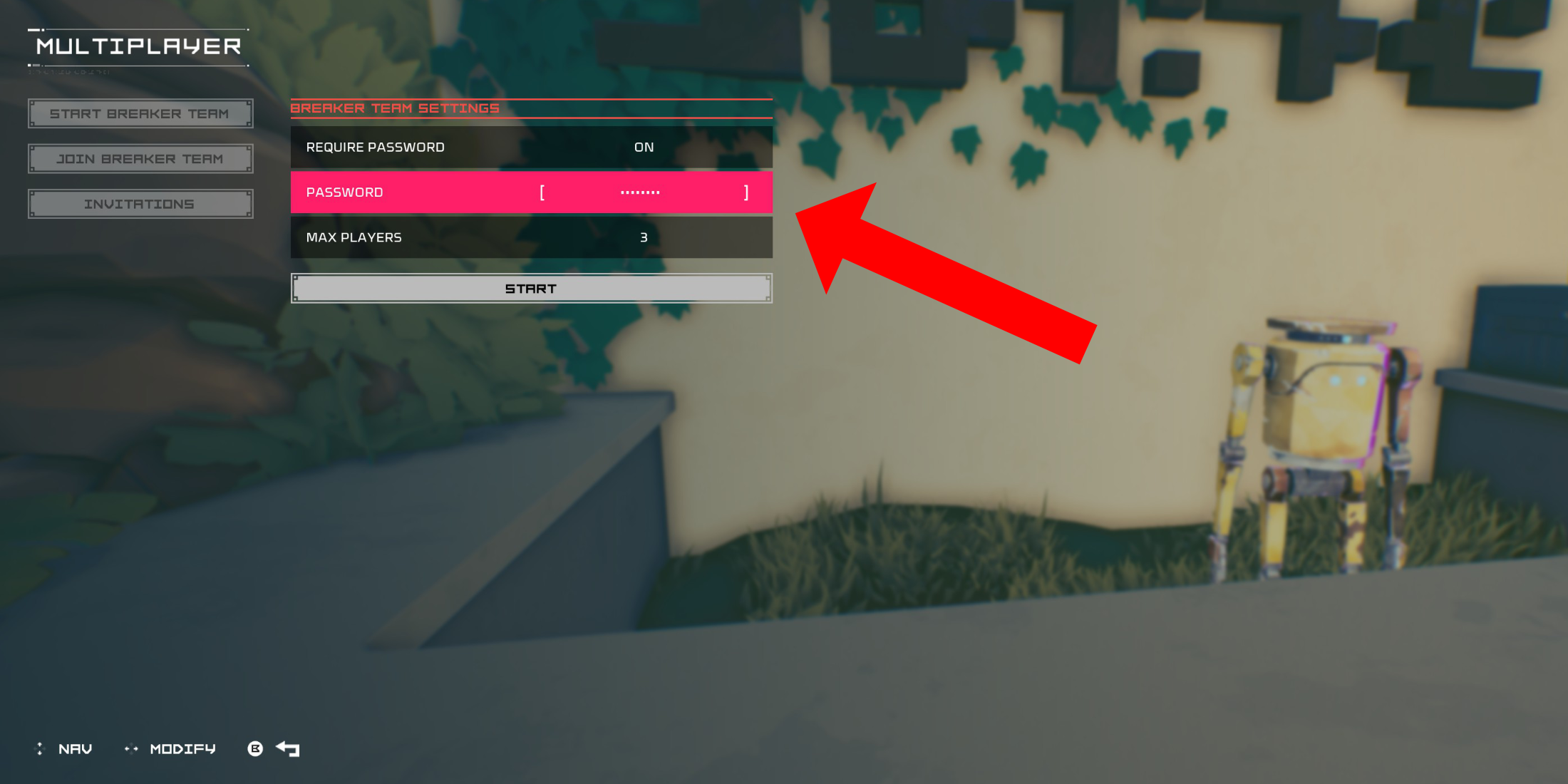 To dive into co-op multiplayer in Hyper Light Breaker, you'll need to set up a Private multiplayer room. Once you've spawned into the Cursed Outpost, the game's hub zone, head over to the counter to the left of your commander, Pherus Bit, who is stationed just opposite the doorway into the Outpost.
To access the Multiplayer menu, press the Interact button (usually R1 or RB) while at the counter. This menu allows you to create or join a Breaker Team, and view your Invitations. To play with your friends, choose "Create Breaker Team".
In the ensuing menu, toggle "Password Required" to "On" and enter a password. After setting up your private Breaker Team, you can invite up to two friends using your platform's social service—whether it's PSN, Xbox, or Steam. The game supports groups of up to three players.
If your friend is already in the game, they'll see the invitation in the "Invitations" tab of the Multiplayer menu. If they're not online, they can join your session via the invitation link you've sent them.
Your team might also appear in the general list of Breaker Teams if there's room for more players. If other methods fail, your friend can search through this list and join your Private group directly.
Once your friend accepts the invite and enters the correct password, you're all set to embark on thrilling co-op adventures in Hyper Light Breaker.
Random Online Matchmaking In Hyper Light Breaker
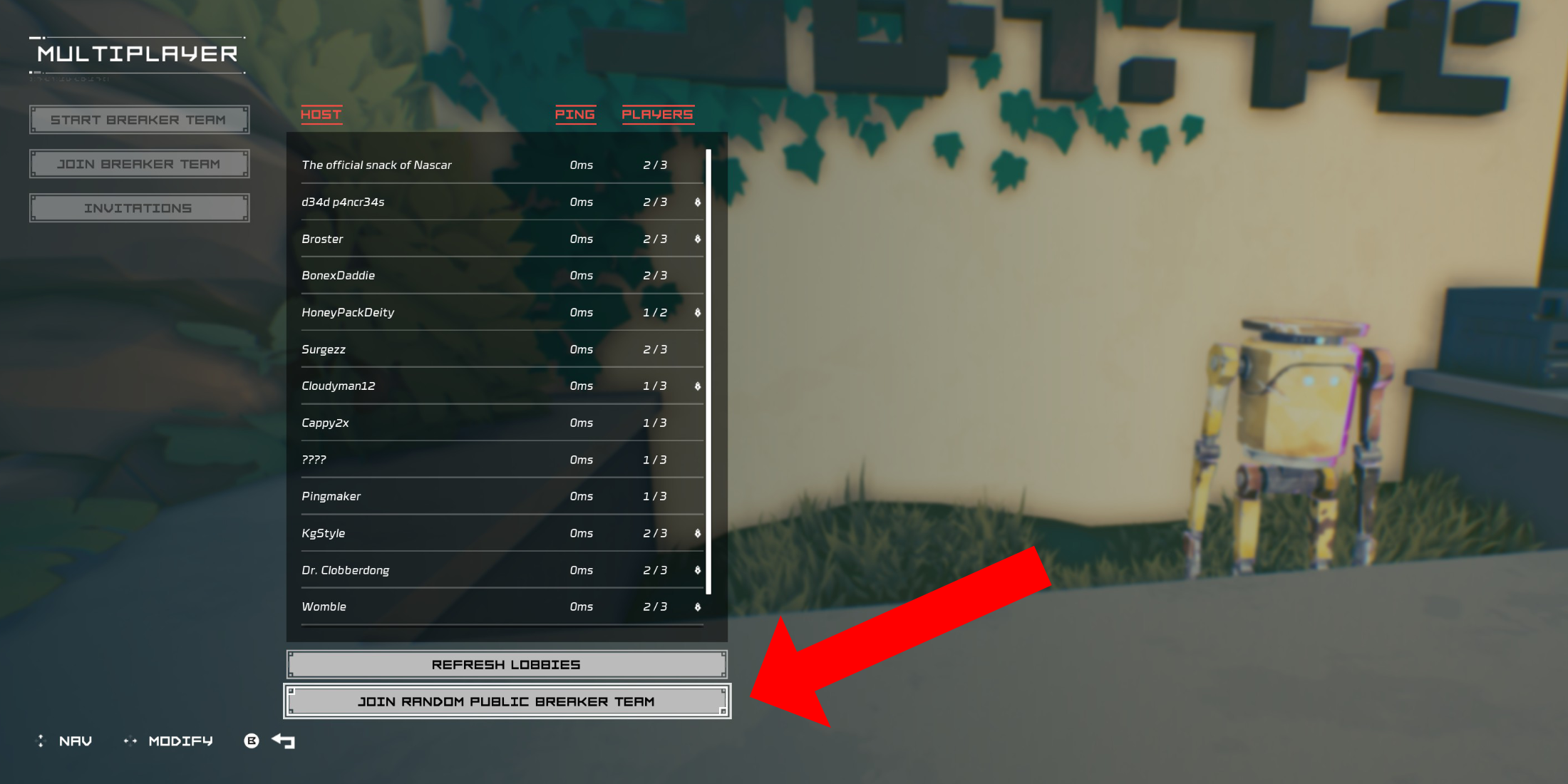 If you're eager to play multiplayer but lack friends who own Hyper Light Breaker, the game's system supports public group creation and joining. To set up a public group, follow the same steps as above but leave the password field blank. Alternatively, to join a random public session, navigate to the multiplayer menu in the Cursed Outpost.
Select "Join Breaker Team", the second option in the menu, then scroll down to "Join Random Public Breaker Team". The game will search for available non-password-protected Breaker Teams and place you into one. After a brief loading screen, you'll enter the world of the Breaker Team's creator.
To exit a multiplayer session, return to the counter at the Cursed Outpost and access the multiplayer menu. If you're currently in a session, you'll see an option to disconnect at the bottom of the list. Selecting this will return you to your own world. Alternatively, you can simply quit the game to end the session.











![Zenless Zone Zero [ZZZ] Codes (December 2024) – 1.4 Livestream Codes](https://imgs.96xs.com/uploads/54/1735628542677396feeb34f.jpg)
- 1 Stellar Blade PC Release Date Confirmed For 2025 Jan 05,2025
- 2 WWE 2K24 Update 1.11 Released Nov 10,2024
- 3 New LEGO Sets for March 2025: Bluey, Harry Potter, and More Mar 06,2025
- 4 Gothic 1 Remake Demo: Frame-by-Frame Comparison with Original May 01,2025
- 5 Roblox's RNG War TD Codes Unleashed (2025 Update) Feb 12,2025
- 6 PUBG Mobile Redeem Codes for January 2025 Live Now Feb 13,2025
- 7 "Assassin's Creed Shadows Unveils Canon Mode" Apr 26,2025
- 8 Pokémon TCG Pocket Unveils Premium Pass and Trade Tokens Apr 21,2025




![Business of Loving [v0.12.5i] [Dead End Draws]](https://imgs.96xs.com/uploads/18/1719555107667e5423ef803.jpg)
-
Top Business Management Apps for Android
A total of 10
-
Best Racing Games to Play Now
A total of 10
-
Best Competitive Multiplayer Games on Android
A total of 10











