
Ninja Time: Trello Board and Discord Integration
Ninja Time is an exciting Roblox game that has captured the attention of players with its dynamic community and comprehensive resources. The game's Trello Board and Discord Channel are treasure troves of information, with the latter experiencing such high traffic that even the verification bot struggled to keep up two weeks ago. If you're eager to dive into the world of Ninja Time and explore its clans, bosses, weapons, and the intriguing Red Eyes feature, here's your guide to accessing the Ninja Time Trello and Discord communities.
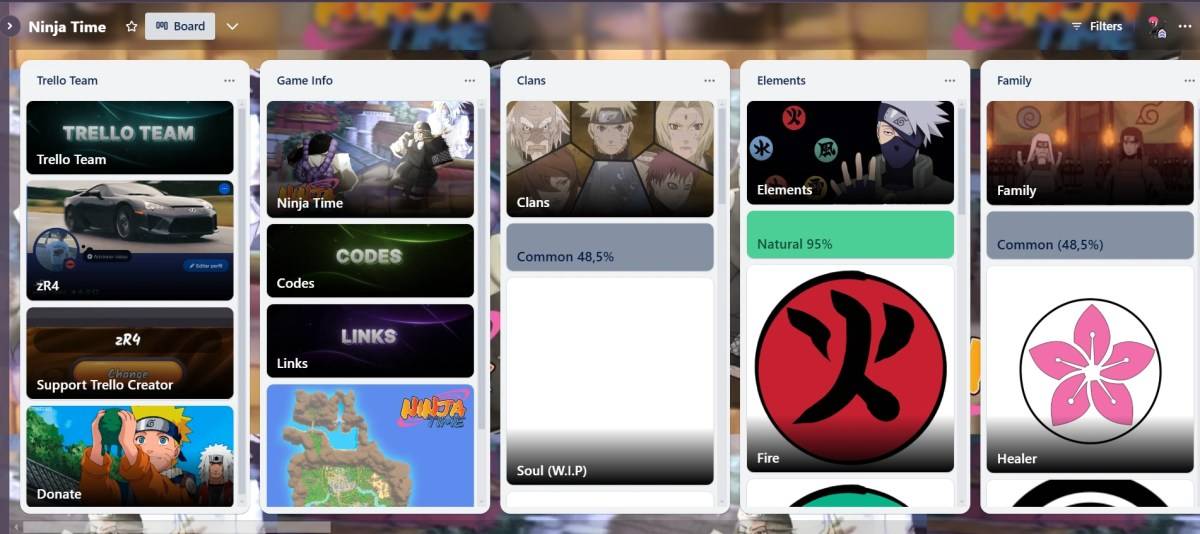
Here's a rundown of all the Ninja Time community channels you can explore:
- Ninja Time Trello Board
- Ninja Time Discord Server
- Vibrant Ninja Time Roblox Group
- Ninja Time X/Twitter Page
Before embarking on your ninja journey, we highly recommend checking out the Trello board. It's an essential starter pack for aspiring ninjas, packed with vital features, items, and game mechanics. Here’s a detailed list of what you'll find:
- All about the game info (Codes, Links, Map of Fire Country)
- All clans
- All elements
- Family
- Red Eyes
- Sub-Jutsus
- All modes
- Skills Modes
- All Bosses
- Raid Boss
- Raid Drops
- All NPCs
- All Consumables (Buffs)
- Accessories
- All Weapons
- Sub Weapons
- Exclusive Collectables
- Other Info (Achievements, Gamepasses, etc.)
While the Discord server may not match the Trello board's depth of basic game information, it excels in other areas crucial to the community, such as codes and giveaways, and even boasts a vibrant fan art section. The Ninja Time Discord server is a chat-based community hub where socializing and information exchange thrive. It supports multiple languages including English, Portuguese, Spanish, and French.
I often visit the Discord server to engage with interesting questions and game suggestions, as it's always beneficial to bring fresh ideas into the game. It's also a great place to find Ninja Time party members or stay updated with the latest game developments.
How to Search Ninja Time on Trello and Discord?
Here's how you can efficiently search through the Ninja Time resources:
| **Prefix** | **Use** | **Prefix** | **Use** |
| **in:** channel-name | Enables search-specific channels like the #questions one (in: questions). | **before:** date | Look for messages sent before a specific date. |
| **from:** username | Find messages from a specific user. | **after:** date | Use to find messages that were sent after a certain date. |
| **has:** image | Search for all the messages that contain images. | **pinned:** true | Locate all messages that are pinned on the server. |
That wraps up our guide to the Ninja Time Trello and Discord communities. Before you embark on your adventure, don't forget to check out our Ninja Time codes to give your character a head start. Happy gaming!










![Zenless Zone Zero [ZZZ] Codes (December 2024) – 1.4 Livestream Codes](https://imgs.96xs.com/uploads/54/1735628542677396feeb34f.jpg)

- 1 WWE 2K24 Update 1.11 Released Nov 10,2024
- 2 Capcom Spotlight February 2025 and Monster Hunter Wilds Showcase: Everything Announced Mar 05,2025
- 3 New LEGO Sets for March 2025: Bluey, Harry Potter, and More Mar 06,2025
- 4 Gothic 1 Remake Demo: Frame-by-Frame Comparison with Original May 01,2025
- 5 PUBG Mobile Redeem Codes for January 2025 Live Now Feb 13,2025
- 6 "Assassin's Creed Shadows Unveils Canon Mode" Apr 26,2025
- 7 Pokémon TCG Pocket Unveils Premium Pass and Trade Tokens Apr 21,2025
- 8 Roblox's RNG War TD Codes Unleashed (2025 Update) Feb 12,2025




![Business of Loving [v0.12.5i] [Dead End Draws]](https://imgs.96xs.com/uploads/18/1719555107667e5423ef803.jpg)
-
Top Business Management Apps for Android
A total of 10
-
Best Racing Games to Play Now
A total of 10
-
Best Competitive Multiplayer Games on Android
A total of 10











