
PoE 2 Console: Essential Loot Filter Guide
Quick Links
Path of Exile 2 loot filters significantly enhance gameplay, especially during intense item drops. They declutter the screen while highlighting valuable items, streamlining the looting process. While convenient on PC, using filters on consoles requires a few extra steps. This guide clarifies the process for PlayStation and Xbox users.
How to Link Path of Exile 2 and Console Accounts
To utilize loot filters on PoE 2's console versions, you must link your console account to your Path of Exile account through the Path of Exile 1 website. Follow these steps:
- Access the Path of Exile website and log in.
- Locate your account name (top-left corner) and click it.
- Select "Manage Account" from the options displayed.
- Under "Secondary Login," click "Connect" for either PlayStation or Xbox.
After selecting "Connect," you'll be redirected to log into your existing PlayStation or Xbox account. Complete the prompts to link your accounts.
Finding and Using Loot Filters
With accounts linked, return to your website profile and click the "Item Filters" button. Then, click "Item Filter Ladder." This opens a new tab displaying available filters.
Select "PoE 2" from the dropdown menu above the filter list. Choose your preferred filter and click "Follow." New players might find NeverSink's semi-strict or regular filters ideal.
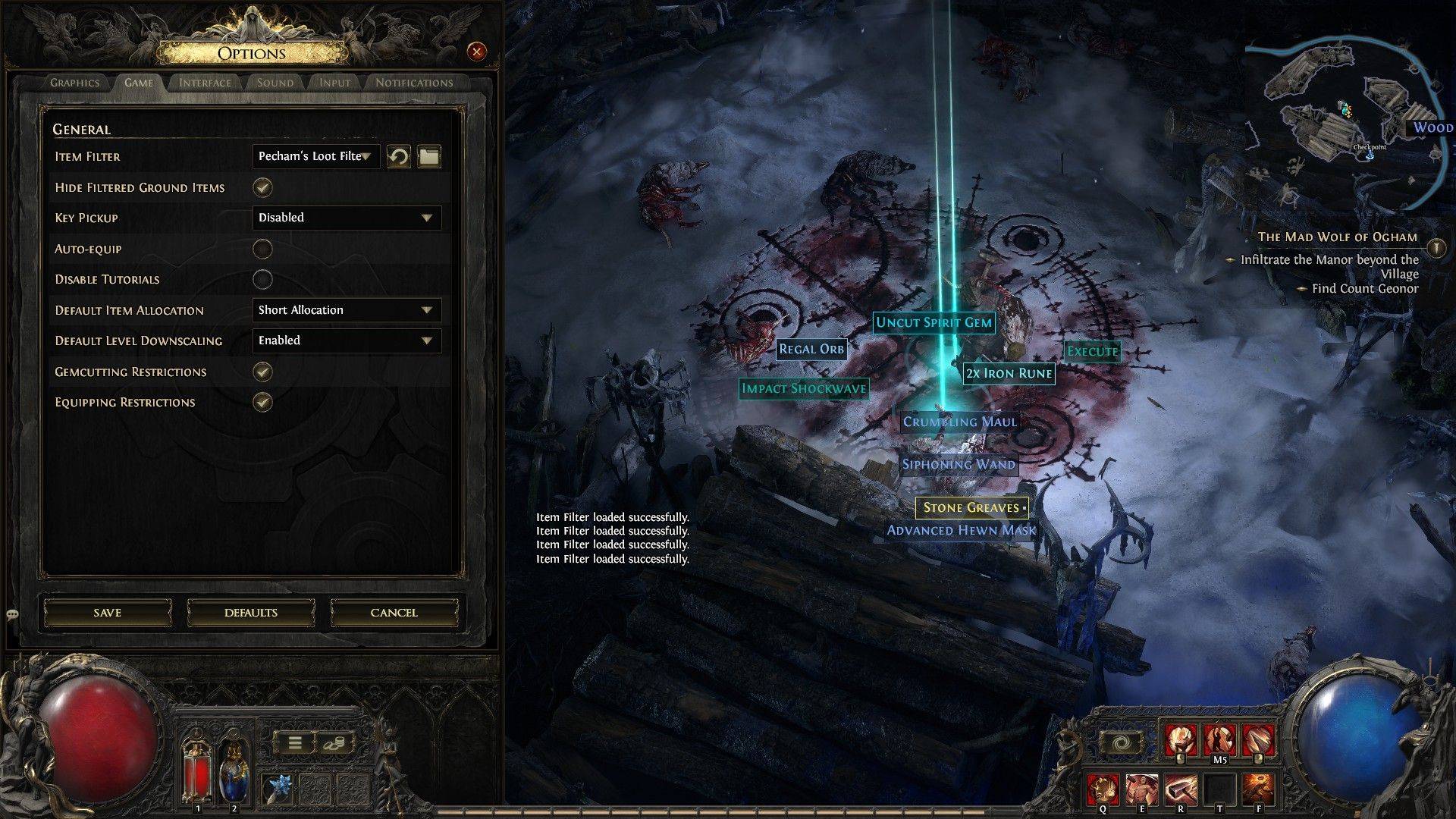 After following a filter, open Path of Exile 2. Navigate to the Options menu, then the Game tab. Select your chosen filter from the "Item Filter" dropdown at the top of the menu and save your settings. Your in-game item drops will now be categorized by the filter's criteria, using different labels, colors, or sound effects.











![Zenless Zone Zero [ZZZ] Codes (December 2024) – 1.4 Livestream Codes](https://imgs.96xs.com/uploads/54/1735628542677396feeb34f.jpg)

- 1 Capcom Spotlight February 2025 and Monster Hunter Wilds Showcase: Everything Announced Mar 05,2025
- 2 WWE 2K24 Update 1.11 Released Nov 10,2024
- 3 New LEGO Sets for March 2025: Bluey, Harry Potter, and More Mar 06,2025
- 4 Gothic 1 Remake Demo: Frame-by-Frame Comparison with Original May 01,2025
- 5 Roblox's RNG War TD Codes Unleashed (2025 Update) Feb 12,2025
- 6 PUBG Mobile Redeem Codes for January 2025 Live Now Feb 13,2025
- 7 "Assassin's Creed Shadows Unveils Canon Mode" Apr 26,2025
- 8 Pokémon TCG Pocket Unveils Premium Pass and Trade Tokens Apr 21,2025




![Business of Loving [v0.12.5i] [Dead End Draws]](https://imgs.96xs.com/uploads/18/1719555107667e5423ef803.jpg)
-
Top Business Management Apps for Android
A total of 10
-
Best Racing Games to Play Now
A total of 10
-
Best Competitive Multiplayer Games on Android
A total of 10











