
Pokemon Home Adds Shiny Keldeo and Meltan
After updating to version 3.2.2 of Pokémon Home, players can obtain Shiny Keldeo and Meltan, but a few specific tasks must be completed first.
While the requirements are demanding, securing Shiny Keldeo is worthwhile because this Legendary Pokémon was previously unobtainable legitimately and Shiny-locked. Now, you can transfer both Shiny Keldeo and Shiny Meltan to other Pokémon games linked to your Home account.
How To Get Shiny Keldeo in Pokemon Home
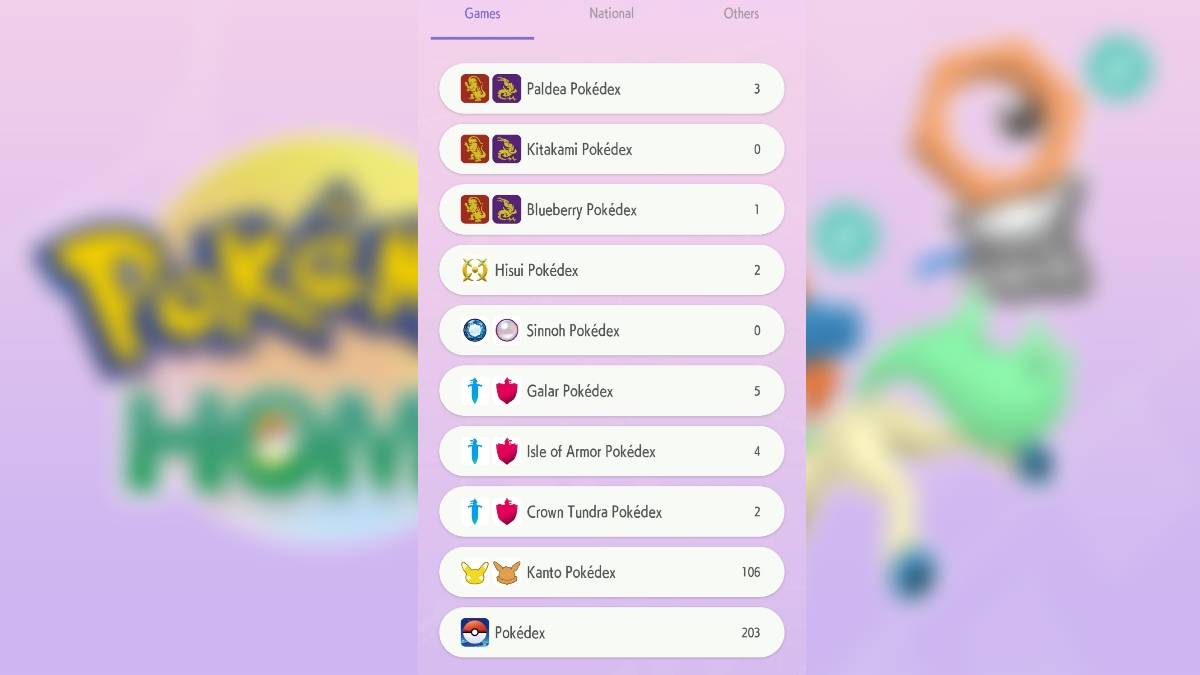
Pokémon Home players can only earn Shiny Keldeo by completing the Galar Pokédex, which includes Pokémon from Sword & Shield, as well as the Isle of Armor and Crown Tundra DLCs and their respective regional Pokédexes.
Once completed, claim your Shiny Keldeo by selecting "Mystery Gift" from the main menu—accessed via the three-line menu icon—which brings up the game's list of options.
Note that Pokémon will only register in the Galar, Isle of Armor, and Crown Tundra Pokédexes if they have the Galar origin mark, indicating they originated from the Sword & Shield base game or DLC. Having completed these Pokédexes in Sword & Shield does not count.
Among Pokémon Home’s origin marks, the Galar mark is a slanted Poké Ball logo located above each Pokémon’s stat screen.
There is no deadline for obtaining Shiny Keldeo, so there’s no need to rush completing your Pokédex.
Related: Best Pokemon GO Incarnate Enamorus Counters: Weaknesses & Resistances Guide
How To Get Shiny Meltan Pokemon Home
Similar to Keldeo, the only way to get Shiny Meltan in Pokémon Home is by completing the Kanto Pokédex using Pokémon from Let's Go Pikachu & Eevee.
To unlock Shiny Meltan, the Pokémon registered in your Home Kanto Pokédex must carry the Let's Go marker, shown as a Pikachu silhouette above each Pokémon's stat screen.
As soon as your Kanto Pokédex is complete in Pokémon Home, you can claim your Shiny Meltan through the Mystery Gift option on the main menu.
Like Keldeo, there is no time limit for unlocking and claiming Shiny Meltan via Mystery Gift in Pokémon Home.
Related: How To Get Shiny Meloetta, Shiny Manaphy, and Shiny Enamorus in Pokemon Home
Why Is Pokemon Home Not Registering My Pokedex?
Some Pokémon Home mobile users have reported issues with Pokémon not registering in their Pokédex due to a data issue, which can typically be fixed by clearing the app's cache.
Following Pokémon’s official support instructions, you can resolve Pokédex registration problems with these simple steps:
After opening the app, select the “Menu” icon in the top-right corner of the title screen (this is a three-line symbol within the circle). Select “Clear Cache.” The game reassures you, “None of the data you’re currently using will be deleted.” Tap the “OK” button. You will then see a message saying “Cache successfully cleared!“ on display, confirming that your cache has been cleared.
If your Pokémon Home Pokédexes weren't registering Pokémon correctly before, they should now update properly.
Now that you know how to get Shiny Keldeo and Shiny Meltan in Pokémon Home, explore the top counters to defeat Mega Tyranitar in Pokémon GO. For more free rewards, check out all the active Pokémon GO promo codes available to redeem for extra bonuses.











![Zenless Zone Zero [ZZZ] Codes (December 2024) – 1.4 Livestream Codes](https://imgs.96xs.com/uploads/54/1735628542677396feeb34f.jpg)

- 1 WWE 2K24 Update 1.11 Released Nov 10,2024
- 2 Capcom Spotlight February 2025 and Monster Hunter Wilds Showcase: Everything Announced Mar 05,2025
- 3 New LEGO Sets for March 2025: Bluey, Harry Potter, and More Mar 06,2025
- 4 PUBG Mobile Redeem Codes for January 2025 Live Now Feb 13,2025
- 5 Gothic 1 Remake Demo: Frame-by-Frame Comparison with Original May 01,2025
- 6 "Assassin's Creed Shadows Unveils Canon Mode" Apr 26,2025
- 7 Roblox's RNG War TD Codes Unleashed (2025 Update) Feb 12,2025
- 8 Pokémon TCG Pocket Unveils Premium Pass and Trade Tokens Apr 21,2025




![Business of Loving [v0.12.5i] [Dead End Draws]](https://imgs.96xs.com/uploads/18/1719555107667e5423ef803.jpg)
-
Top Business Management Apps for Android
A total of 10
-
Best Racing Games to Play Now
A total of 10
-
Best Competitive Multiplayer Games on Android
A total of 10











