

Blink
- Video Players & Editors
- 2.7.11
- 104.29 MB
- by Blink AI for Talking Videos
- Android Android 8.0+
- Nov 02,2021
- Package Name: com.vistring.blink.android
Blink APK is transforming the realm of video creation applications for Android users. It is tailor-made for mobile content producers seeking sophisticated technology in a user-friendly format. This app is ideal for individuals aiming to elevate their video production. Whether you are a vlogger, influencer, or seeking to enhance your video content, Blink effectively turns your Android device into a professional video creation studio.
How to use Blink APK
- Download Blink latest version and install it on your Android device.
- Once installed, open the app and register or log in to your account.
- Explore the array of features Blink offers by navigating through the user-friendly interface.
- Select the tool or feature you wish to use for your video project.
- Import or record a video directly within the app to create your videos.
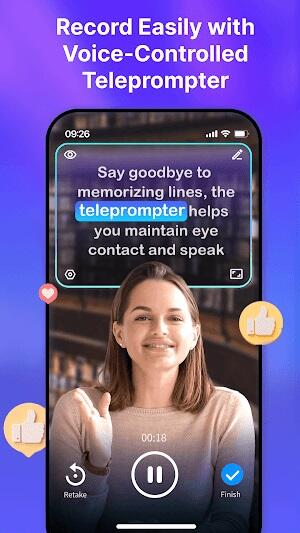
- Use AI-powered functionalities like captions, teleprompter, and editing tools to enhance your video.
- Preview your edited video within the app, make adjustments if needed, and then save or share your creation.
Innovative Features of Blink APK
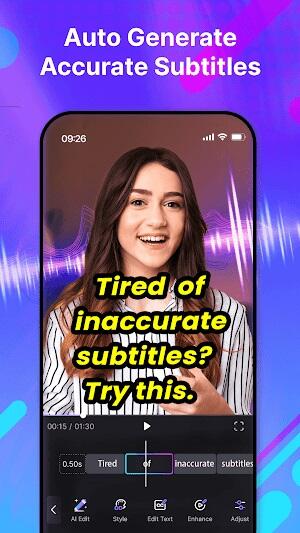
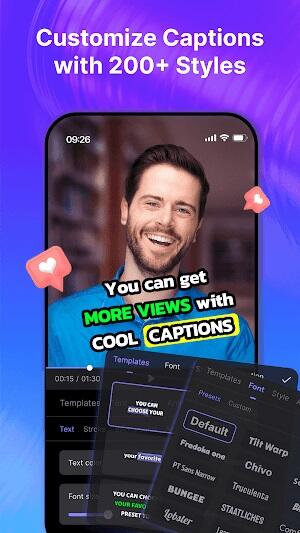
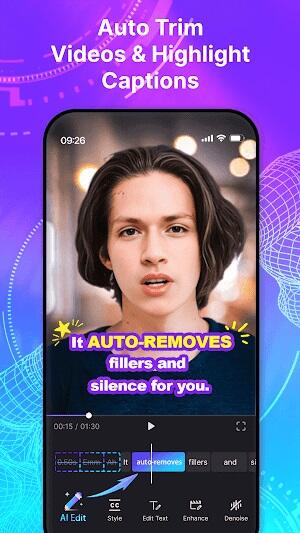
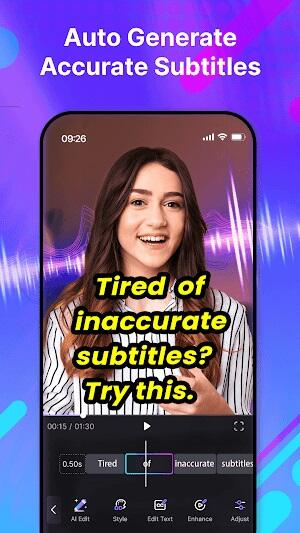
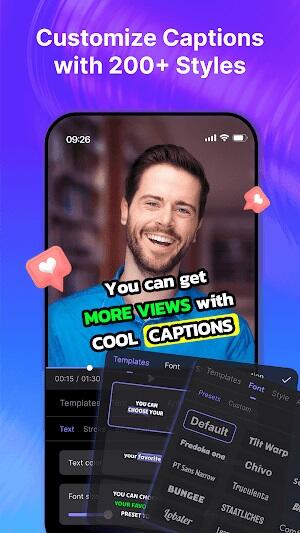
- AI Captions: Blink revolutionizes video subtitles with its AI Captions feature. This tool automatically generates stylish and accurate video captions, enhancing accessibility and engagement. It supports multiple languages and file formats, offering a range of fashionable caption styles.
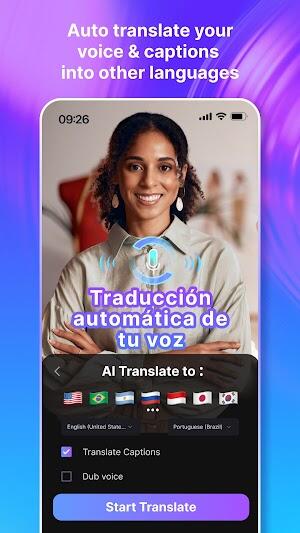
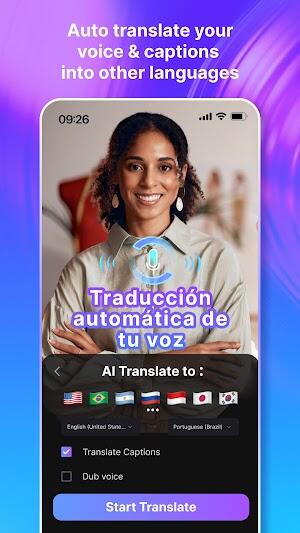
- AI Translate: The AI Translate feature in the Blink app breaks language barriers. It effortlessly converts your video's audio and text into various languages. This feature is perfect for reaching a global audience, offering precise dubbing and subtitles in numerous languages.
- AI Script: With AI Script, Blink transforms your rough ideas into polished scripts. This AI-powered tool allows you to focus more on your message and less on the writing process, ensuring a smooth flow of ideas in your video content.
- AI Title: The AI Title feature in Blink automatically creates engaging video intro animations. This tool helps personalize your content with pre-designed title animations, making your videos stand out.
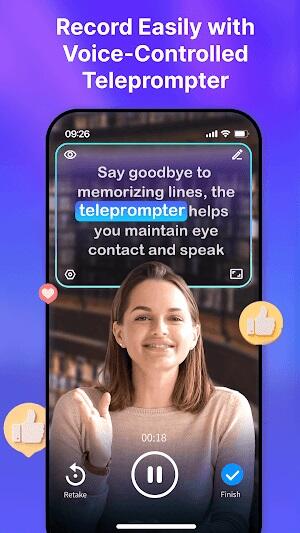
- AI Teleprompter: Forget the hassle of memorizing scripts. The AI Teleprompter in Blink scrolls text at your speaking pace, ensuring a natural and confident delivery in your videos.
- AI Video Editor: Editing becomes a breeze with the AI Video Editor. This innovative feature in the Blink app allows you to edit videos through text manipulation, making the editing process intuitive and time-efficient.
- AI Background: Switch up your video background instantly with the AI Background feature. This tool provides the flexibility of a virtual green screen, giving you the option to either blur or swap out your background without requiring extra gear.
- Fun Emojis, GIFs & Sound Effects: Enhance your videos with fun using Blink's library of emojis, GIFs, and sound effects. This characteristic enhances the level of creativity and involvement in your content.
Advertisement
- AI Noise Reducer: Ensure crystal-clear audio in your videos with the AI Noise Reducer. This feature removes unwanted background noise, providing a professional sound quality to your videos.
- AI Beauty Filters: Improve your on-camera appearance with Blink's AI Beauty Filters. These filters subtly enhance your features, ensuring you always look your best in your videos.
Best Tips for Blink APK
- Maximize the AI-powered features: Utilize the full range of AI-powered features in Blink to streamline your video production process. These functionalities are crafted to reduce the time and energy you spend, enabling you to concentrate on the artistic elements of your content.
- Tailor your captions: Experiment with different caption styles to find the one that works best for your videos. With Blink, you have a variety of styles and formats at your disposal, ensuring your captions align with the tone and aesthetics of your video.
- Leverage the teleprompter: Make the most of the teleprompter feature in Blink. This tool is invaluable for delivering your script naturally, maintaining eye contact with the camera, and ensuring a confident, fluid presentation.
- Utilize noise reduction for clear audio: Enhance the audio quality of your videos by using the noise reduction feature. This tool helps eliminate background noise, ensuring your message is heard clearly and professionally.
- Enhance your appearance with beauty filters: Don’t hesitate to use beauty filters to improve your on-screen appearance. These filters in Blink can subtly refine your features, making you camera-ready in no time.
- Regularly update the app: Keep your Blink app updated to take advantage of the latest features and improvements. App updates often include new tools, enhanced functionalities, and bug fixes, enhancing your overall video creation experience.
- Engage with the Blink community: Participate in the forums and social media groups. Engaging with other users can provide valuable tips, creative ideas, and solutions to common challenges you might face while using the app.
- Backup your projects: Regularly back up your Blink projects. This precaution ensures you don’t lose your work in case of unexpected issues with your device or the app itself.
Advertisement
Blink APK Alternatives
- Elegant Teleprompter: If you're exploring alternatives to Blink in the realm of apps for video players & editors, consider Elegant Teleprompter. It's a user-friendly choice for script scrolling, offering features like adjustable text size and speed. Ideal for those who prefer simplicity, this app ensures a seamless teleprompting experience for novice and professional video creators. Its straightforward interface makes it a go-to for anyone looking to enhance their on-camera presentations without complex functionalities.
- BIGVU Teleprompter & Captions: Another excellent alternative to Blink is BIGVU Teleprompter & Captions. This app stands out in the video players & editors category with its robust features. It offers automated captions, making your videos more accessible. Its teleprompter functionality is intuitive, allowing for a smoother script delivery. Perfect for content creators who need both captioning and teleprompting in one app, BIGVU is a versatile choice for enhancing your video production quality.
- BIGVU AI Subtitles & Prompter: It is a worthy contender in the apps category, offering a similar suite of features as Blink. This app excels in generating AI-powered subtitles, easing the process of creating multilingual content. Its teleprompter feature is also noteworthy, assisting in delivering scripts with confidence. For content creators looking for an app that combines advanced subtitle technology with effective teleprompting, BIGVU AI Subtitles & Prompter is worth considering.
Conclusion
Blink MOD APK is a major advancement in video editing and content creation. Its AI-driven features, easy-to-use design, and adaptable capabilities are suitable for a diverse range of requirements and expertise levels. For anyone looking to enhance their video content, whether for personal enjoyment or professional outreach, Blink stands as a top choice. Its ability to simplify complex editing processes and its innovative features make it a valuable asset in any content creator's toolkit.
-
ORF Steiermark

-
Watermark remover for TikTok

-
Baixar musicas gratis MP3

-
Hot Shots : Web Series

-
Hype Text - Animated Text & In
-
Airbuds Widget
-
70s Music Disco & Rock
-
Salim Bahanan Al-Qur’an Merdu

-
Rabbit Movies: Web Series

-
Our Father Prayer Audio

-
SNXX VIDEO PLAYER 2020 : All Format Video Player
-
A kora live كوره لايف بث مباشر مجانا

-
DD Live TV Free

-
letvHD

-
 GameStop Launches Nintendo Switch 2 Amid Stapler Chaos
Remember when retail giant GameStop accidentally damaged hundreds of Nintendo Switch 2 consoles by stapling receipts through their screens during launch? GameStop certainly hasn't forgotten, as their latest Switch 2 advertisement playfully references
Dec 15,2025 -
 Warframe's Big PAX East Reveal Coming Soon
Warframe's upcoming story expansion will debut at PAX EastThe beloved Leap of the Lotus event makes its seasonal returnRecent developer broadcasts showcased Warframe's Android gameplayWarframe players have been enjoying the Techrot Encore update acro
Dec 14,2025 - ◇ Nintendo Switch 2 Pricing Revealed Dec 13,2025
- ◇ Black Myth: Wukong News & Updates Dec 12,2025
- ◇ Duskbloods: Latest Developments Dec 12,2025
- ◇ Frontier's Hunt and Hook Out Now Dec 12,2025
- ◇ Witcher 4 2026 Launch Denied Dec 11,2025
- ◇ Idle Heroes: Sylvie's Skills, Artifacts & Tree Paths Dec 11,2025
- ◇ Flappy Bird Relaunches on Epic Games Store Dec 11,2025
- ◇ Acecraft: Sky Hero Revives Arcade Co-Op, Pre-Register Now Dec 11,2025
- ◇ Space Squad Survival: Resource Management, Alien Combat Dec 11,2025
- ◇ Former Rockstar Dev Endorses GTA 4 Remaster, Lauds Niko as Series’ Best Protagonist Dec 10,2025




- 1 Zenless Zone Zero [ZZZ] Codes (December 2024) – 1.4 Livestream Codes Feb 08,2025
- 2 Capcom Spotlight February 2025 and Monster Hunter Wilds Showcase: Everything Announced Mar 05,2025
- 3 New LEGO Sets for March 2025: Bluey, Harry Potter, and More Mar 06,2025
- 4 Gothic 1 Remake Demo: Frame-by-Frame Comparison with Original May 01,2025
- 5 Blazing Conquest: Conquer Lords Mobile on Mac with BlueStacks Air Feb 21,2025
- 6 "Tower of God: New World Introduces Alphine and Kaiser" Jun 28,2025
- 7 PUBG Mobile Redeem Codes for January 2025 Live Now Feb 13,2025
- 8 Pokémon TCG Pocket Unveils Premium Pass and Trade Tokens Apr 21,2025





-
Best Racing Games to Play Now
A total of 10
-
Top Business Management Apps for Android
A total of 10
-
Best Competitive Multiplayer Games on Android
A total of 10











