

xShare- Transfer & Share files
XShare - File Transfer & Sharing
XShare - File Transfer & Sharing is an excellent tool for sharing files effortlessly. It's fast, free, and doesn't require an internet connection. With Wi-Fi Direct, it ensures secure and speedy file transfers between devices with just a few taps.
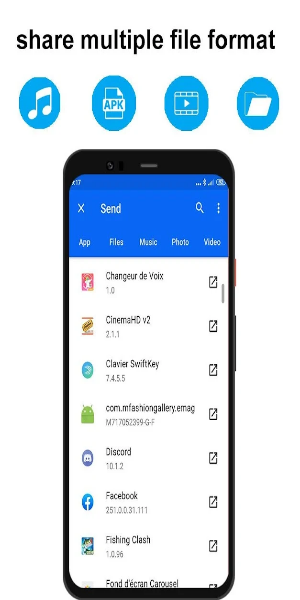
Highlights
- Instant connection and sharing with just a click, eliminating the need for QR code scanning.
- Lightning-fast transmission speeds: Experience rapid file transfers without relying on a network!
- Share a variety of files (Word, Excel, ZIP, folders, etc.), as well as movies, music, photos, and videos anytime, anywhere.
- Efficient File Manager: Quickly view and delete files with ease.
- Sleek new user interface: Intuitive navigation for seamless sharing and faster transfers.
User-Friendly Interface
XShare simplifies file transfer by leveraging Wi-Fi Direct technology for direct device-to-device connections. Unlike traditional networks, Wi-Fi Direct eliminates the need for a router. To utilize XShare, install the app on both sender and receiver devices.
Once connected, select files and tap "send." XShare swiftly transfers files via Wi-Fi Direct, outpacing traditional Wi-Fi or Bluetooth transfers. Its built-in file manager streamlines organization and browsing before sharing.
While XShare supports diverse features, its compatibility is restricted to Wi-Fi Direct-enabled devices, potentially excluding older models.
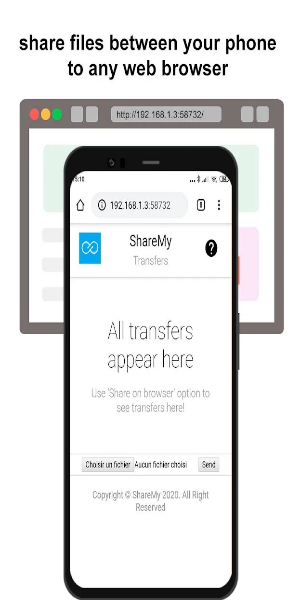
Efficient Sharing Tool
Despite its Wi-Fi Direct limitation, XShare facilitates swift and hassle-free file sharing, offering diverse features tailored to user needs. Though it has drawbacks, including limited compatibility, its rapid transfers and intuitive interface make it a preferred choice for many users.
Key Features
Offline Convenience: Swift transmission without the need for an internet connection, anytime, anywhere!
- Transfers hefty files swiftly without data usage.
Effortless Connectivity: Connect instantly with a single click, bypassing QR code scans.
- Seamless connection without QR code hassles!
Enhanced Speed:
- Experience rapid transfers, a more convenient alternative to Bluetooth!
Ironclad Security:
- Rest assured of privacy protection. Safeguard your files with Telegram's secure transmission!
Streamlined File Management:
- Effortlessly manage and delete files within a single app!
Revamped UI:
- Embark on a new transfer journey with our fresh user interface!
Top-notch Security:
- Ensuring file privacy with robust security measures!
Universal Compatibility:
- Send various file types across all Android devices effortlessly: apps, images (PNG, JPG), music, videos (MP3), documents, PDFs, zipped files, and more.

User Guide
Ensure that XShare is installed on both devices before proceeding. Follow these simple steps to transfer files:
- Choose the file and tap "Send/Receive" on your device.
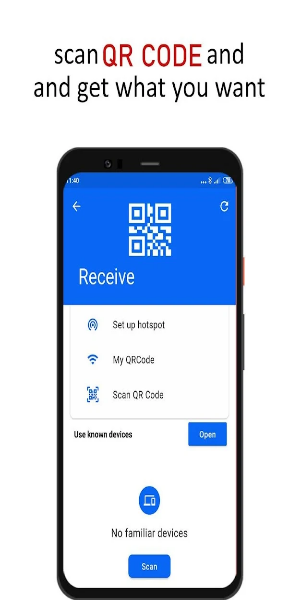
- The recipient scans the QR code to establish connection with the sender.
- Click to connect and send successfully!
It's that simple! Start sharing now!
Please note: During app usage, XShare will acquire location data to facilitate transfer connections. This involves: 1) Identifying nearby devices through Bluetooth scanning. 2) Creating a Wi-Fi hotspot for the receiving device. 3) Using the camera to scan QR codes for device connection. However, XShare will not store or upload location information in any circumstance.
Pros & Cons
Pros:
- Rapid file transfer
- User-friendly interface
- Supports various file types
- Unlimited sharing
Cons:
- Exclusive Wi-Fi Direct compatibility
-
Crowdtap: Surveys & Rewards

-
Fitmint: Get paid to walk, run

-
Zeo Fast Multi Stop Route Plan

-
Appie

-
Clover-Period & Cycle Tracker

-
BestFit Pro - Gym Workout Plan

-
Hi)

-
HOW TO MAKE HER FALL IN LOVE WITH YOU

-
Crunchtime Teamworx

-
Google Home

-
شرطة الأطفال - مكالمة وهمية

-
MyBlue Nebraska

-
White Noise for Sleep Relax Mod

-
mobile.de Auto-Panorama

-
 RS Pharaoh’s Folly: Alter Fate in Shifting Tombs
Jagex has unveiled their April Developer Diary detailing the latest RuneScape update – Return to the Desert: Pharaoh's Folly. This brand-new limited-time quest launches today and remains available until April 28th. Players must navigate the treach
Dec 22,2025 -
 Hero Stickman RPG Revives Side-Scrolling Beat ‘Em Ups
Hero Stickman makes its Android debut today, offering a unique mix of turn-based tactics, dungeon exploration, and side-scrolling action. Developed by F5GAME, this RPG features stickman-style warriors with deep character collection mechanics, element
Dec 22,2025 - ◇ Minetris Debuts Ultimate Tetris Mobile Game Dec 21,2025
- ◇ Demon Hunters Tops Netflix Charts with Historic Viewership Dec 21,2025
- ◇ Devil Hunter Raider: Essential Class Tactics Revealed Dec 21,2025
- ◇ Enola Holmes 3 Starts Shooting, Brown and Cavill Back Dec 21,2025
- ◇ Uno Wonder Mobile Game Launches Next Month Dec 20,2025
- ◇ Wind Waker HD for Switch 2 Being Considered Dec 20,2025
- ◇ "First Official Godzilla LEGO Set Unveiled" (43字符) Dec 19,2025
- ◇ Candy Crush All Stars Tournament Returns for Fifth Edition Dec 19,2025
- ◇ inZOI Axes Denuvo DRM Following Apology Dec 18,2025
- ◇ Nintendo's Switch 2 Supply to Meet US Demand Dec 18,2025




- 1 Zenless Zone Zero [ZZZ] Codes (December 2024) – 1.4 Livestream Codes Feb 08,2025
- 2 Capcom Spotlight February 2025 and Monster Hunter Wilds Showcase: Everything Announced Mar 05,2025
- 3 New LEGO Sets for March 2025: Bluey, Harry Potter, and More Mar 06,2025
- 4 Gothic 1 Remake Demo: Frame-by-Frame Comparison with Original May 01,2025
- 5 PUBG Mobile Redeem Codes for January 2025 Live Now Feb 13,2025
- 6 Blazing Conquest: Conquer Lords Mobile on Mac with BlueStacks Air Feb 21,2025
- 7 "Tower of God: New World Introduces Alphine and Kaiser" Jun 28,2025
- 8 Pokémon TCG Pocket Unveils Premium Pass and Trade Tokens Apr 21,2025





-
Best Racing Games to Play Now
A total of 10
-
Top Business Management Apps for Android
A total of 10
-
Best Competitive Multiplayer Games on Android
A total of 10











