
Qmanager
- Productivity
- 2.20.1.1103
- 57.97M
- Android 5.1 or later
- Dec 16,2024
- Package Name: com.qnap.qmanager
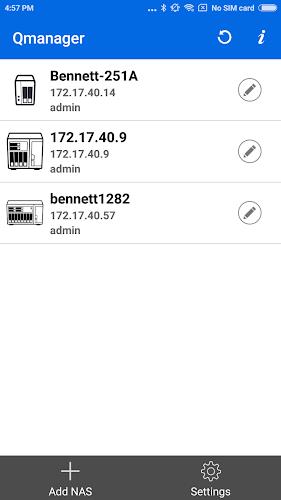
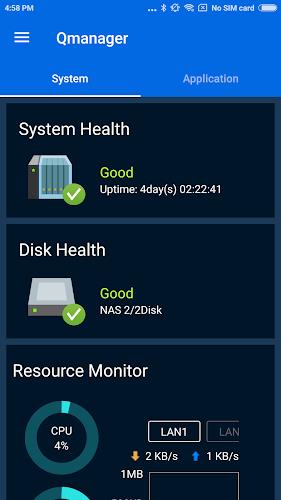
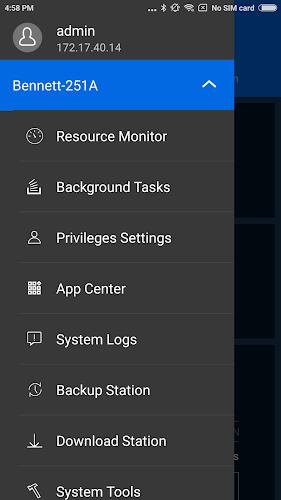
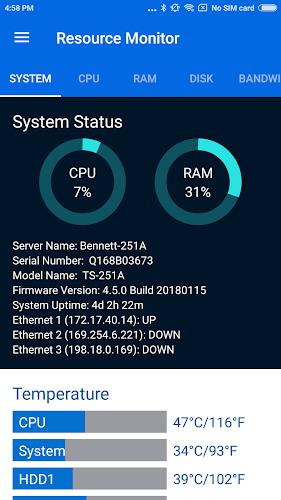
Manage and monitor your QNAP TurboNAS effortlessly with the free Qmanager app for Android devices. With easy-to-understand system information such as CPU and memory usage, as well as system events and online users, you can stay updated on the status of your NAS. Additionally, you can manage your download and backup tasks remotely, pause or run tasks, and even turn on/off application services with a simple click. Ensure the security of your NAS with the ability to check connection status and prevent invasion. Other convenient features include remote restart or shutdown, finding your NAS with the "Beep" sound, and Wake-on-LAN (only supported on Local Network). Download Qmanager now.
Features of this app:
- Monitor system information: With Qmanager, users can easily monitor the system information of their QNAP TurboNAS. This includes CPU usage, memory usage, system event information, and online user status. This feature allows users to keep track of their NAS performance and ensure that everything is running smoothly.
- Check download and backup tasks: Qmanager allows users to check the status of their download and backup tasks. They can also manage these tasks remotely, pausing or running them as needed. This feature provides convenient control over file transfers and ensures that important data is backed up effectively.
- Turn on/off application services: Qmanager offers the ability to control application services with just one click. Users can easily turn on or off services as needed, providing flexibility and efficiency in managing their TurboNAS.
- Check connection status and prevent invasion: Users can check the connection status of their TurboNAS and view the current online users. This helps to prevent unauthorized access and ensure the security of the system.
- Remote restart or shutdown: Qmanager allows users to remotely restart or shutdown their TurboNAS. This feature is particularly useful in situations where physical access to the device is not possible.
- Find MyNAS feature: Qmanager includes a "Find MyNAS" feature that allows users to locate their NAS by triggering a "Beep" sound. This feature is helpful in case the NAS is misplaced or lost within the local network.
In conclusion, Qmanager is a versatile app for Android devices that provides users with the ability to monitor and manage their QNAP TurboNAS remotely. With features like system monitoring, task management, application service control, and remote restart/shutdown, it offers convenience and flexibility in managing the NAS. Additionally, the Find MyNAS feature enhances security by helping users locate their NAS within the local network. Overall, Qmanager is an essential tool for QNAP TurboNAS users who want to easily control and maintain their systems from their mobile devices.
-
CamScanner- scanner, PDF maker

-
HotTunnel VPN

-
iLuno | Tercih LGS YKS DGS TUS

-
Alertswiss

-
StudyGe - World Geography Quiz

-
PDF reader - Image to PDF

-
Ibnsina Pharma

-
Winners Institute App

-
Rexdl: Happy Mod Games & Apps

-
Computrabajo Ofertas de Empleo

-
IPC Diglot - English, Hindi

-
Calendar Widget: Month/Agenda
-
EmployWise

-
Photomate (for Checkmate)

-
 Uno Wonder Mobile Game Launches Next Month
Uno Wonder brings the latest version of the beloved card game to mobile devices.Launching on September 17th, it invites you on a global cruise adventure.Experience classic Uno with exciting new twists and challenging boss battles.Uno is a timeless fa
Dec 20,2025 -
 Wind Waker HD for Switch 2 Being Considered
Nintendo's decision to release the GameCube version of Wind Waker for Switch 2 doesn't rule out a potential Wind Waker HD port. Read on to understand Nintendo's perspective and learn about the HD version's significant improvements over the original.W
Dec 20,2025 - ◇ "First Official Godzilla LEGO Set Unveiled" (43字符) Dec 19,2025
- ◇ Candy Crush All Stars Tournament Returns for Fifth Edition Dec 19,2025
- ◇ inZOI Axes Denuvo DRM Following Apology Dec 18,2025
- ◇ Nintendo's Switch 2 Supply to Meet US Demand Dec 18,2025
- ◇ MindsEye Studio Begins Layoffs After Disastrous Launch Dec 18,2025
- ◇ Outer Worlds 2 Unleashes Bold RPG Character Creation - IGN Dec 18,2025
- ◇ Black Myth: Wukong Pauses Story for Zhong Kui Dec 18,2025
- ◇ Maxroll Launches BitCraft Game Guides Dec 17,2025
- ◇ Basketball Rivals' Release Date Unveiled: Trailer, Trello, Playtest Dec 17,2025
- ◇ Solo Leveling: Arise Marks First Anniversary with Events Dec 17,2025




- 1 Zenless Zone Zero [ZZZ] Codes (December 2024) – 1.4 Livestream Codes Feb 08,2025
- 2 Capcom Spotlight February 2025 and Monster Hunter Wilds Showcase: Everything Announced Mar 05,2025
- 3 New LEGO Sets for March 2025: Bluey, Harry Potter, and More Mar 06,2025
- 4 Gothic 1 Remake Demo: Frame-by-Frame Comparison with Original May 01,2025
- 5 Blazing Conquest: Conquer Lords Mobile on Mac with BlueStacks Air Feb 21,2025
- 6 PUBG Mobile Redeem Codes for January 2025 Live Now Feb 13,2025
- 7 "Tower of God: New World Introduces Alphine and Kaiser" Jun 28,2025
- 8 Pokémon TCG Pocket Unveils Premium Pass and Trade Tokens Apr 21,2025




-
Best Racing Games to Play Now
A total of 10
-
Top Business Management Apps for Android
A total of 10
-
Best Competitive Multiplayer Games on Android
A total of 10











